
ERPNext Customization: What Should You Customize—and What Should You Leave Standard?
ERPNext Customization: What Should You Customize—and What Should You Leave Standard?
 admin
admin
ERPNext can be adapted to fit a wide range of business processes. That flexibility is one of the platform’s strongest advantages.
It can also create problems when every difference between ERPNext and an existing business process is treated as a development requirement.
ERPNext Customization: What to Customize vs Leave Standard
A company moving from spreadsheets, Tally, a legacy ERP, or another business application may arrive at implementation with a long list of requests:
“Add this field.”
“Change this approval.”
“Make this screen work like our old software.”
“Build this report.”
“Automate this calculation.”
“Connect ERPNext to this other application.”
Some of those requests are valid ERPNext customization requirements. Others can already be handled through standard ERPNext features, configuration, workflows, custom fields, reports, or process changes.
The important question is therefore not simply: Can ERPNext be customized?
It can.
The better question is: What should you customize, and what should you deliberately leave standard?
This guide provides a practical framework for making that decision. It explains the difference between configuration, lightweight customization, scripting, custom Frappe app development, and integration—and how businesses can choose the simplest maintainable approach that genuinely solves the requirement.
What Is ERPNext Customization?
ERPNext customization means adapting the system beyond its default setup so that it better supports a particular business requirement.
That adaptation can be extremely small.
For example, a company may need an additional field in the Customer master to record an internal classification. ERPNext’s Customize Form functionality allows administrators to add custom fields and change properties of standard fields through the front end. (Frappe Documentation)
At the other end of the spectrum, a company may have a specialized operational process that requires new DocTypes, business logic, integrations, or a separate Frappe application.
Those two requirements should not be treated as the same type of customization.
The first may require a few configuration changes.
The second may require software development, testing, documentation, version control, deployment, and future compatibility management.
Configuration, Customization and Custom Development are not the same thing.
Consider a simple requirement:
Purchase Orders above ₹5 lakh require an additional management approval.
A team could immediately ask a developer to write code.
But ERPNext already supports multi-level approval processes through Workflows. Workflow states, transition rules, roles, and conditions can be configured for a DocType. (Frappe Documentation)
In that situation, the requirement may be primarily configuration, not custom development.
Compare that with a requirement such as:
Our business operates a specialized equipment lifecycle that cannot be represented adequately using any existing ERPNext transaction or standard module.
That requirement needs a deeper fit-gap assessment. A custom DocType, application, or integration may genuinely be justified.
ERPNext and the Frappe Framework provide several layers for adapting the system, including:
- Custom Fields and form changes
- Workflows
- Print-format changes
- Reports
- Client Scripts
- Server-side scripting where the deployment permits it
- Custom DocTypes
- Custom Frappe applications
- APIs and integrations
Frappe’s scripting documentation, for example, distinguishes Client Scripts, Server Scripts, Script Reports, and other scripting mechanisms. (Frappe Documentation)
The capability exists. The decision is choosing the appropriate layer.
ERPNext Configuration vs Customization vs Custom Development
These terms are often used interchangeably during ERP projects. They should not be.
Understanding the difference helps businesses avoid paying for software development when a simpler approach would work.
Configuration
Configuration uses capabilities that already exist in ERPNext and adjusts how they operate for your organization.
Depending on the requirement, configuration may include:
- Company and accounting settings
- Warehouses
- Roles and permissions
- Naming conventions
- Workflow rules
- Document settings
- Master-data structures
- Standard module settings
The underlying capability already exists. The implementation team is deciding how your company should use it.
Lightweight Customization
Lightweight customization changes how ERPNext captures, presents, or handles information without necessarily creating an entirely new application.
Examples include:
- Adding a Custom Field
- Changing a form layout
- Changing certain field properties
- Adjusting document presentation
- Creating a tailored report
- Adding specific user-interface behaviour
ERPNext’s Customize Form tool is designed for changes such as adding Custom Fields and modifying supported properties of standard fields. (Frappe Documentation)
Scripting and Automation
Some requirements need logic rather than only configuration.
A Client Script can define custom behaviour executed in the user’s browser. Frappe specifically notes that validations implemented only through Client Scripts apply to the standard browser form and do not automatically enforce the same rule through API or System Console access. (Frappe Documentation)
Server-side requirements need different handling.
Frappe does support Server Scripts, but there is an important deployment consideration: from version 15, Server Scripts are disabled by default on shared benches, and Frappe Cloud public shared benches do not allow them. (Frappe Documentation)
For more substantial server-side requirements, the correct solution may therefore be an application rather than assuming every rule belongs in an in-app script.
Custom Development
Custom development becomes relevant when a requirement goes beyond reasonable configuration or lightweight extension.
A custom Frappe app can contain its own DocTypes, server-side code, integrations, modules, hooks, and other application logic.
Frappe describes an app as a Python package built using the Frappe Framework. Applications have their own source structure and can extend the system independently of ERPNext’s standard application code. (turqosoft.com)
Integration
Sometimes the right answer is not to build functionality inside ERPNext at all.
Suppose a company already uses a specialized logistics platform that performs its job well.
There may be two possible approaches –
Option A: Rebuild the logistics capability inside ERPNext.
Option B: Retain the logistics platform and exchange relevant data with ERPNext through integration.
Option B may be more sensible if the external application provides specialized functionality that ERPNext does not need to duplicate.
The architectural decision should therefore come before the development estimate.
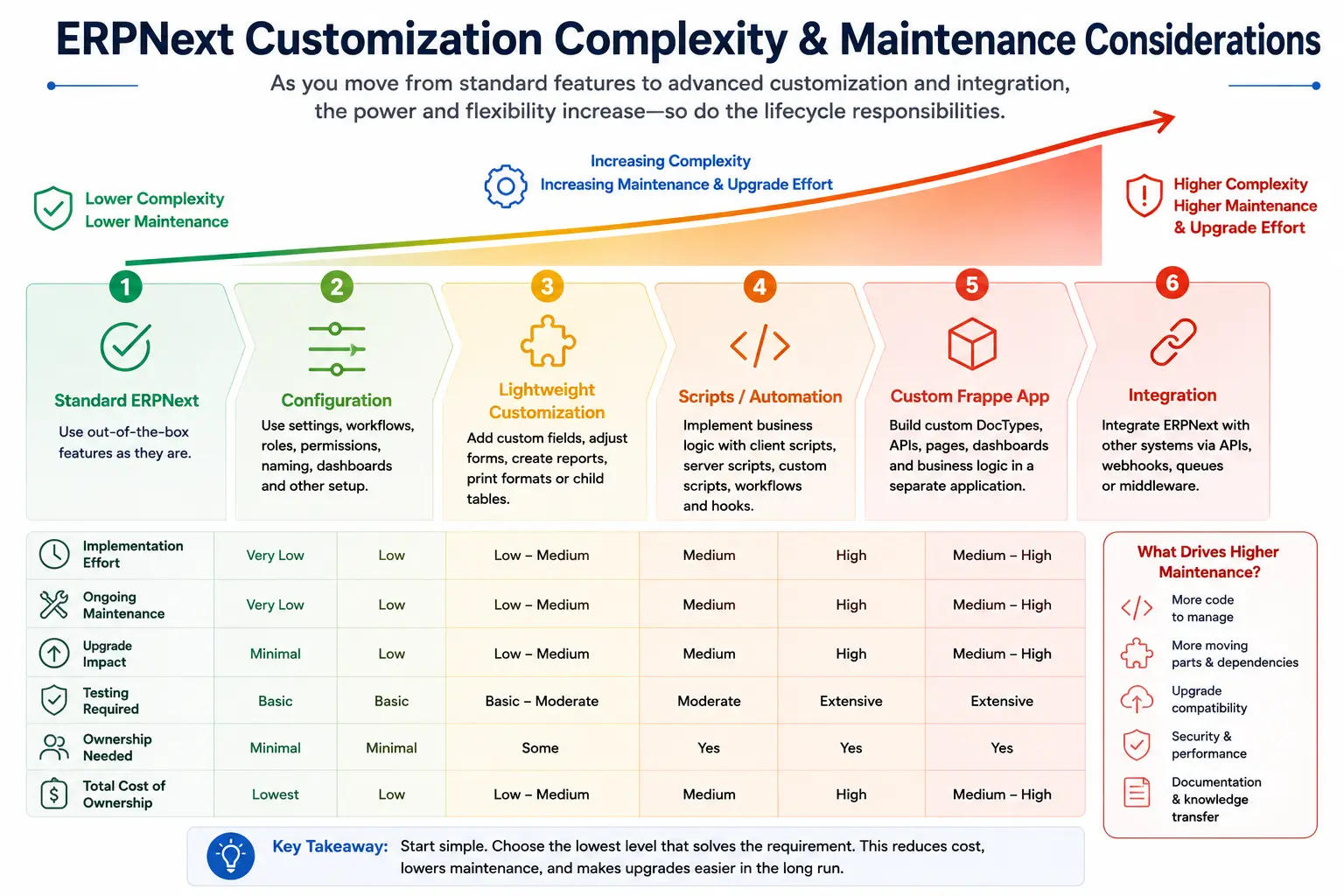
| Approach | Typical example | Relative complexity | Development normally required? | Ongoing consideration |
| Standard ERPNext | Existing standard transaction or module | Lowest | No | Product upgrades |
| Configuration | Workflow, roles, settings | Low | Usually no | Configuration governance |
| Lightweight customization | Fields, layouts, reports | Low–Medium | Sometimes | Testing and documentation |
| Script or automation | Specific business logic | Medium | Yes | Compatibility and testing |
| Custom Frappe app | Specialized process or module | Higher | Yes | Version and application maintenance |
| Integration | ERPNext connected to another system | Medium–High | Yes | Both systems and API dependencies |
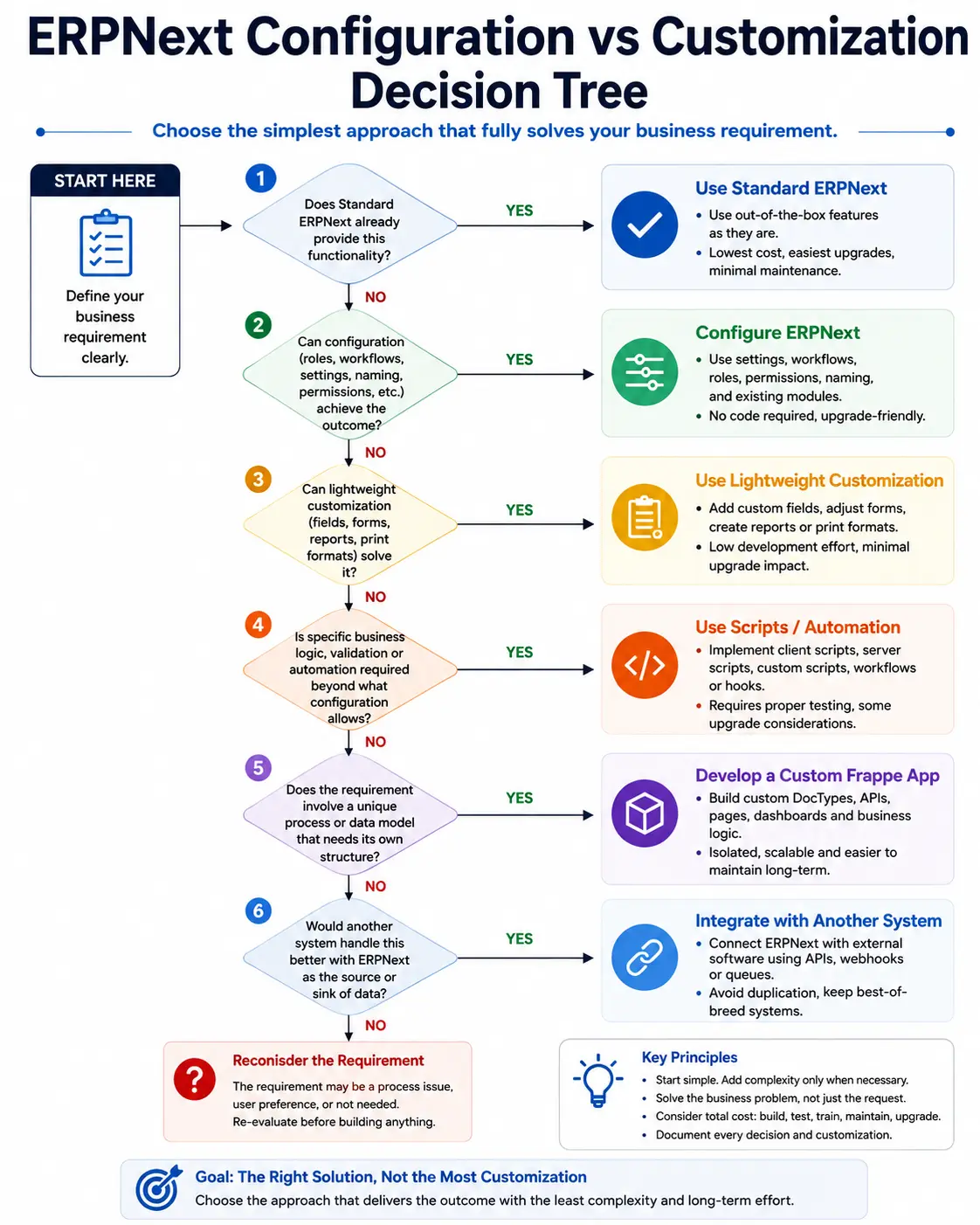
The important principle is simple, Start with the least complex approach that completely solves the business requirement.
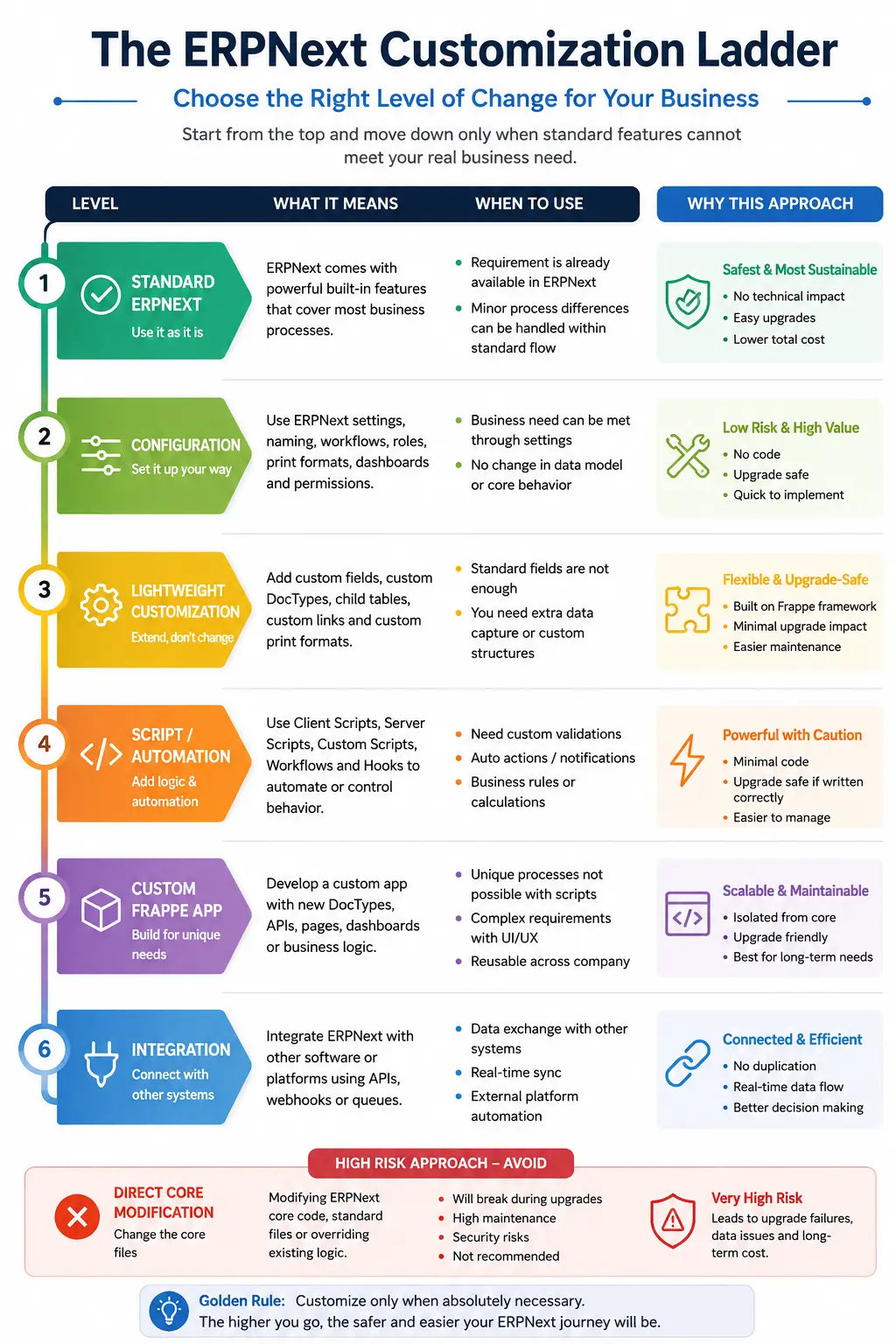
The ERPNext Customization Ladder: Start With the Simplest Solution
A useful way to evaluate ERPNext customization is to think of it as a ladder.
You should not climb higher until the lower level has been properly evaluated.
Level 1: Can standard ERPNext already handle it?
Start here.
Before documenting a customization request, determine whether ERPNext already supports the underlying requirement.
Sometimes the perceived gap comes from:
- incomplete configuration;
- an overlooked standard feature;
- users not knowing the correct process;
- a different ERPNext module handling the requirement;
- the organization expecting ERPNext to behave exactly like its previous system.
This stage requires functional knowledge, not programming.
Level 2: Can configuration solve it?
Suppose management wants quotations above a defined value to move through additional approval.
A Workflow may solve the requirement without creating custom software. ERPNext supports multiple workflow states, transition rules, roles, and approval conditions. (Frappe Documentation)
Configuration should usually be evaluated before code because it keeps more of the implementation within standard product mechanisms.
Level 3: Can lightweight customization solve it?
Perhaps the business needs to capture a customer attribute that ERPNext does not include by default.
A Custom Field may be enough.
ERPNext officially supports adding fields through Customize Form and adjusting supported form properties. (Frappe Documentation)
There is no reason to build a new module for a requirement that needs one additional data point.
Level 4: Does the requirement need scripting or automation?
Code becomes reasonable when the requirement involves conditional logic or behaviour that standard configuration cannot express adequately.
The implementation team should then determine where the logic needs to operate.
If the behaviour only affects the browser interface, a Client Script may sometimes be appropriate.
If the rule must apply regardless of whether data enters ERPNext through a form, API, integration, background process, or another route, browser-only logic may be insufficient.
This distinction matters because Frappe explicitly notes the scope limitation of Client Script validation. (Frappe Documentation)
Level 5: Does it justify a custom Frappe app?
A custom application becomes more appropriate when the requirement represents a genuine business capability rather than a small adjustment.
Potential candidates include processes that are:
- operationally important;
- repeated frequently;
- structurally different from existing ERPNext processes;
- difficult to maintain through scattered scripts;
- dependent on several related DocTypes or business rules;
- substantial enough to require disciplined software development.
A custom app should be treated as software, not as a collection of quick fixes.
That means requirements, architecture, source control, testing, deployment, documentation, and ownership all matter.
For a deeper discussion, see Turqosoft’s ERPNext Custom App Development guide.
Level 6: Should ERPNext integrate instead?
If another system already performs a specialized function effectively, integration deserves consideration before redevelopment.
Common situations can include connections with:
- e-commerce platforms;
- logistics applications;
- specialized industry software;
- external portals;
- legacy systems that must remain in operation;
- other business applications.
The design question becomes, Which system should own each process and dataset, and what information needs to move between them?
The Red Zone: Modifying ERPNext Core
Directly changing standard ERPNext source code creates a very different maintenance situation from extending ERPNext through supported mechanisms.
When standard application code is modified, future upstream changes can conflict with those modifications.
A better architecture generally uses Frappe’s extension mechanisms, applications, hooks, and APIs wherever practical rather than treating the ERPNext codebase itself as the customization layer.
That does not mean a custom app is maintenance-free.
It still needs compatibility review and testing when ERPNext or Frappe versions change.
When Should You Customize ERPNext?
Avoiding unnecessary customization does not mean avoiding customization altogether.
There are legitimate reasons to extend ERPNext.
Standard ERPNext cannot adequately support a critical process
The word critical matters.
A process may justify custom development when the absence of the required behaviour causes a meaningful operational problem and standard ERPNext, configuration, and supported extensions cannot adequately solve it.
A preference for a familiar screen layout is different from a missing operational capability.
The requirement creates measurable operational value
A useful customization should solve an identifiable problem.
For example:
- repetitive manual data entry may be creating errors;
- a high-volume process may require automation;
- a control may need to be enforced systematically;
- the same information may be maintained in multiple systems;
- management may lack information needed for a specific operational decision.
Before approving development, ask: If we do not build this customization, what measurable business problem remains?
If the project team cannot answer that question clearly, the requirement deserves another review.
The requirement reflects a genuinely distinctive process
Some businesses operate processes that standard ERP software cannot reasonably anticipate.
A specialized manufacturing process, service lifecycle, distribution model, or industry-specific activity may require purpose-built functionality.
In those cases, adapting ERPNext can be more practical than forcing the business into an unsuitable generic workflow.
A process or regulatory requirement genuinely demands it
Some organizations have controls, documentation requirements, or operational obligations that require changes beyond the standard system.
Any specific statutory or regulatory requirement should be validated against the applicable current rules before it is designed into the ERP.
Integration cannot solve the problem more effectively
Development inside ERPNext should be compared with integration.
If another system is already the better tool for the job, retaining it and connecting it to ERPNext may produce a cleaner architecture.
When Should You Not Customize ERPNext?
This is where many ERP projects become unnecessarily complicated.
When ERPNext already does it
A process should not be customized simply because the standard workflow looks different from the previous software.
First determine whether the business outcome is already supported.
When you are recreating the old ERP
One of the easiest ways to undermine an ERP implementation is to reproduce the previous system inside the new one.
A migration creates an opportunity to ask:
- Why does this step exist?
- Who actually uses this information?
- What decision depends on it?
- Is the process still required?
- Does standard ERPNext already provide a better way?
If every old screen, field, report, and approval is copied without analysis, the organization may carry old inefficiencies into a new platform.
When you are recreating Excel
A spreadsheet may contain 40 columns because that was the easiest way to manage information manually.
That does not mean the ERP needs 40 new fields.
Some columns may be:
- calculated information;
- temporary working notes;
- duplicated master data;
- information available elsewhere in ERPNext;
- fields no longer used for any decision.
Treat the spreadsheet as evidence of a business process, not as a database specification.
When the underlying process is the real problem
Consider this request:
“We need a custom field because one department sends this information to another department every morning.”
The correct question is not immediately “What field type should we create?”
Ask why the information needs to be sent manually at all.
The requirement may actually be solved through standard document status, permissions, workflow, reporting, or better process design.
When customization exists mainly for user preference
User experience matters, but every preference does not justify permanent software complexity.
There is a difference between: “Users prefer the button on the left” and “Users cannot complete a critical transaction correctly with the current process.”
The second deserves more weight.
When nobody has considered lifecycle cost
The cost of a customization is not only the amount paid to build it.
A meaningful evaluation should consider: Analysis + Development + Testing + Documentation + Training + Deployment + Maintenance + Future compatibility testing
A small development request can remain in the system for years.
When nobody will own it
Once custom logic becomes part of daily operations, somebody needs responsibility for it.
The organization should know:
- why the customization exists;
- what requirement it satisfies;
- where the code or configuration is maintained;
- what other processes depend on it;
- how it is tested;
- who supports it after go-live.
A customization that nobody understands becomes a support problem later.
Customization red flags
Certain statements deserve further investigation before development starts:
“Our old software did it this way.”
“We’ve always followed this process.”
“Make ERPNext look exactly like our spreadsheet.”
“It’s only a small change.”
“We can document it later.”
None automatically means the requirement is wrong. They do mean the implementation team should understand the business reason before writing code.
ERPNext Customization Examples for Real Business Scenarios
The following are illustrative scenarios, not customer case studies.
Manufacturing
Imagine a manufacturer requires a special production approval before a particular operation can proceed.
The wrong starting question is: What custom module should we build?
A better sequence is:
- Can standard ERPNext manufacturing functionality represent the process?
- Can Workflow or permissions add the required control?
- Is a small extension sufficient?
- Does the requirement involve a genuinely new production process that needs custom data structures and logic?
Only after those questions are answered should custom app development be considered.
Distribution and Dealerships
A distributor may request unusual pricing approval, warehouse allocation logic, dealer controls, or secondary-sales processes.
Some requirements may already be handled through ERPNext configuration and standard transactions.
Others may involve business-specific logic that genuinely requires development or integration.
The important point is not the industry label.
It is the fit-gap analysis for each requirement.
Trading Businesses
A trading business may ask for:
- additional credit controls;
- a particular management report;
- specialized document output;
- another approval layer.
These requests should be separated.
A new document layout is not the same architectural problem as a custom credit-control engine.
Multi-location Businesses
A multi-branch organization may believe it needs customization to obtain branch-level visibility.
Before developing anything, review whether the requirement can be satisfied through an appropriate combination of warehouse structure, permissions, company structure, accounting dimensions, standard reports, and role design.
If a genuine gap remains after that analysis, customization can then target the gap rather than rebuilding the entire structure.
| Business requirement | First thing to evaluate | Likely starting direction |
| Additional approval level | Workflow capability | Configuration |
| Extra information on a master | Custom Field | Lightweight customization |
| Different management report | Existing report/reporting options | Standard or custom report |
| Specialized operational process | Functional fit-gap analysis | Possible custom app |
| External specialized platform | APIs and system ownership | Integration |
| Recreate old ERP screen | Underlying business requirement | Reconsider first |
Custom Field vs Workflow vs Script vs Custom Frappe App
Choosing the correct mechanism is more important than choosing the fastest mechanism.
Use a Custom Field when…
You need to capture an additional piece of structured information on an existing DocType and the standard data model does not already provide it.
ERPNext’s Customize Form tool supports adding Custom Fields through the front end. (Frappe Documentation)
Use a Workflow when…
The requirement concerns approval states, roles, transition rules, or conditional movement of a document through an approval process.
ERPNext Workflows can define multiple approval levels and conditions. (Frappe Documentation)
Consider a Client Script when…
The requirement concerns browser-side form behaviour or a specific user-interface interaction that cannot be achieved through normal configuration.
Remember that browser-side validation does not automatically protect other transaction paths such as APIs. (Frappe Documentation)
Consider server-side logic or a custom app when…
The rule must be enforced consistently at the server level, is structurally important, spans several processes, or has grown beyond what should reasonably live as isolated scripts.
Frappe’s Script API documentation explicitly notes that when more capability is required than in-app scripting provides, an Application with event handlers in Python modules is the appropriate path. (Frappe Documentation)
Consider integration when…
Another application should remain responsible for part of the process.
ERPNext does not need to absorb every system around it.
Does ERPNext Customization Affect Future Upgrades?
It can.
The extent depends heavily on what was customized and how it was implemented.
Why customization can increase upgrade complexity
A customization may depend on:
- a standard DocType;
- a field or method;
- an API;
- document behaviour;
- another Frappe application;
- a particular version of ERPNext.
When the underlying platform changes, those dependencies should be checked.
Why separate extensions are preferable to uncontrolled core changes
Keeping custom application code separate from ERPNext’s standard source makes ownership and version management clearer.
It also avoids mixing custom changes directly into the upstream ERPNext codebase.
That is one reason substantial custom development should normally be structured as a proper Frappe application rather than a series of undocumented modifications.
Upgrade-compatible does not mean maintenance-free
An application can follow good extension architecture and still require work during an upgrade.
A responsible upgrade process may include:
- reviewing ERPNext/Frappe release changes;
- updating a staging environment;
- checking custom applications;
- testing critical business processes;
- testing integrations;
- running user acceptance or regression scenarios;
- resolving incompatibilities before production deployment.
Turqosoft’s guide to ERPNext Support After Go-Live discusses the importance of defining responsibility for customizations, integrations, and upgrade-related support after implementation. (turqosoft.com)
Documentation Matters
For meaningful customizations, maintain at least: Requirement → Business reason → Implementation approach → Dependencies → Test scenarios → Owner
This information becomes particularly valuable when the original implementation team is no longer involved.
ERPNext Customization Cost in India: What Actually Determines It?
There is no useful universal price for “ERPNext customization.”
Adding a field and developing an industry-specific operational application are both called customization, but they are entirely different scopes of work.
The more useful question is:
What determines the cost of this specific requirement?
Complexity matters more than the number of requests
A list containing ten Custom Fields may require less effort than one complex integration.
Likewise, a requirement that sounds small during a meeting may affect several DocTypes, validations, reports, permissions, and downstream transactions.
The requirement must therefore be analyzed before it is estimated.
Common cost drivers
Customization effort can depend on:
- business-analysis effort;
- complexity of the rule or workflow;
- number of affected documents;
- new data structures required;
- external integrations;
- migration or existing-data considerations;
- testing requirements;
- user acceptance testing;
- documentation;
- deployment;
- future maintenance responsibilities.
One-time development cost is not the full cost
A useful way to evaluate a proposed customization is through customization total cost of ownership: Build + Test + Train + Maintain + Upgrade-test
This does not mean businesses should reject custom development.
It means the business case should justify the lifecycle cost.
Why accurate estimates require requirement analysis
A responsible ERPNext customization quotation should explain:
- what business requirement is being solved;
- whether standard ERPNext was evaluated;
- what will be configured versus developed;
- assumptions and exclusions;
- integrations or dependencies;
- testing scope;
- documentation;
- support responsibility.
A low headline development price is not useful if the requirement itself has not been understood.
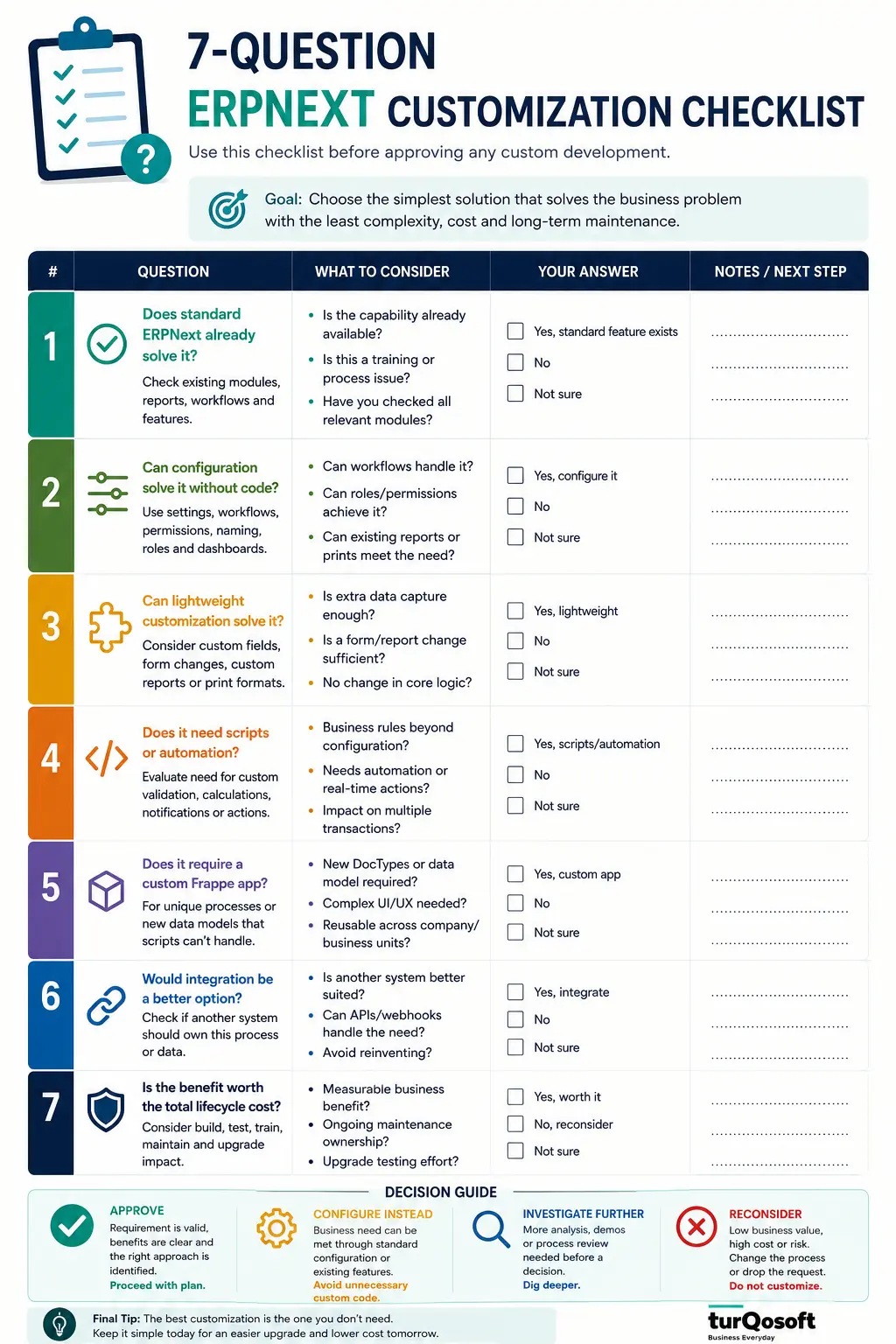
A 7-Question Test Before Approving Any ERPNext Customization
Before approving development, ask these seven questions.
1. Does standard ERPNext already solve the requirement?
Check the actual business outcome, not whether ERPNext reproduces the old screen.
2. Can configuration solve it without code?
Evaluate workflows, roles, settings, standard transactions, fields, reports, and relevant modules first.
3. What business problem does the requirement solve?
Write the problem in one sentence.
If the requirement cannot be connected to a business problem, reconsider it.
4. How frequently does the problem occur?
A problem affecting thousands of transactions may justify a different investment than an inconvenience occurring twice a year.
5. What measurable benefit will the customization create?
Possible outcomes include fewer manual steps, stronger control, lower error exposure, faster processing, or removal of duplicate work.
Use the metric that actually fits the requirement.
6. What maintenance and upgrade implications does it introduce?
Understand who will maintain it and how it will be tested after platform changes.
7. Is customization better than changing the process or integrating another system?
Software development should compete with the alternatives.
After these questions, classify the requirement as: Approve | Configure Instead | Investigate Further | Reconsider
Questions to Ask an ERPNext Partner Before Custom Development
The quality of customization depends partly on the questions asked before development begins.
Ask a prospective ERPNext implementation or development partner:
- Have you checked whether standard ERPNext already handles this requirement?
- Why are you recommending customization?
- Could configuration or Workflow achieve the same outcome?
- Does this require a script, custom DocType, or full custom application?
- Will any standard ERPNext core files be changed?
- How will the customization be documented?
- What testing is included?
- How will future ERPNext upgrades be tested against it?
- Who will maintain the custom code?
- How will changes in scope be managed?
A capable implementation partner should be comfortable telling you that some requested customizations are unnecessary.
That is part of ERP consulting.
The goal is not to maximize the amount of code written. It is to implement a system that solves the operational requirement without creating avoidable complexity.
Make the Customization Decision Before You Write the Code
The best ERPNext customization strategy is not to customize as little as possible.
Nor is it to adapt ERPNext to every process the organization currently follows.
The goal is to choose the simplest maintainable solution that genuinely satisfies the business requirement.
For one requirement, that may mean standard ERPNext.
For another, a Workflow or Custom Field may be enough.
A genuinely specialized process may justify a custom Frappe application.
And sometimes the better answer is to change the business process or integrate another system instead.
Businesses evaluating customization should therefore begin with a fit-gap decision: Standard → Configure → Customize → Develop → Integrate → Reconsider
Not sure which of your ERPNext requirements actually need customization?
An ERPNext Customization Fit-Gap Assessment can review your requirements against standard ERPNext and identify which items can be handled through configuration, which genuinely require customization, and which may be better solved through process changes, custom app development, or integration.
The aim is not to create more customization.
It is to create the right amount.